We Use CookiesWe use cookies to enhance the security, performance, functionality and for analytical and promotional activities. By continuing to browse this site you are agreeing to our privacy policy

10 Best Hp Color Printers 2025 in the United States

How do we rank products for you?

Our technology thoroughly searches through the online shopping world, reviewing hundreds of sites. We then process and analyze this information, updating in real-time to bring you the latest top-rated products. This way, you always get the best and most current options available.

headphones-stars

Our Top Picks

#1

Winner

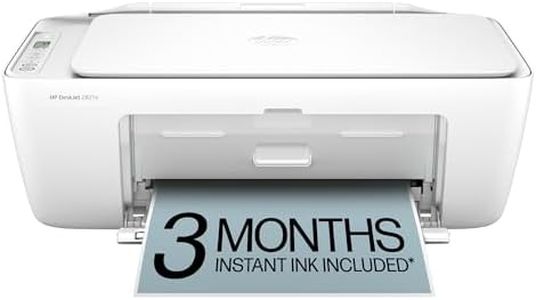
HP DeskJet 2827e Wireless All-in-One Color Inkjet Printer, Scanner, Copier, Best-for-Home, 3 Month Instant Ink Trial Included, AI-Enabled (6W7F5A)

Rating
10.0
Chosen by1,288
Print Quality (Resolution)
Print Speed
Connectivity Options

Most important from
1961 reviews

Print Quality (Resolution)
Prints vibrant, sharp color documents and photos with crisp text quality, ideal for everyday tasks and homework.
Print Speed
Printing speed is moderate, making it suitable for occasional use but less ideal for large volume jobs.
Connectivity Options
Setup is quick and straightforward, with seamless Wi-Fi and direct connections that get you printing in minutes.
Ink/Toner Cost and Yield
The included 3-month Instant Ink trial offers a valuable cost-saving advantage right from the start.
Additional Features
The compact all-in-one design makes it perfect for home use, combining printing, scanning, and copying in a lightweight unit.

The HP DeskJet 2827e is a compact, user-friendly color inkjet printer designed mainly for home use. It prints decent-quality color documents at a moderate speed of up to 5.5 pages per minute (ppm) and black-and-white documents faster at 7.5 ppm. Thanks to HP’s AI technology, it smartly adjusts web pages and emails for neat printing, helping avoid wasted paper and awkward layouts.

Connectivity is a strong point here, with reliable Wi-Fi, USB, and wireless direct printing, plus compatibility with AirPrint and Google Cloud Print. This makes it easy to print from smartphones, tablets, or computers. The 60-sheet input tray is suitable for light to moderate printing needs, but if you regularly print large batches, refilling paper often may be necessary. One drawback is that automatic two-sided (duplex) printing isn’t supported; you’ll need to flip pages manually. Ink costs can add up since it uses HP 67 cartridges, but the included 3-month Instant Ink trial can help reduce running costs initially by delivering ink before it runs out.

Additional features like scanning and copying add value for home office tasks, though the scanner resolution is basic. The printer’s small footprint and eco-friendly design, with recycled plastic and energy certifications, make it a good fit for environmentally conscious users with limited space. This printer is best suited for casual home users who want straightforward wireless printing with occasional scanning and copying, while appreciating smart print formatting and easy smartphone control. It is less ideal if fast, heavy-duty printing or automatic duplexing is a priority.

Rating
10.0
Chosen by1,288
Print Quality (Resolution)
Print Speed
Connectivity Options

Most important from
1961 reviews

Print Quality (Resolution)
Prints vibrant, sharp color documents and photos with crisp text quality, ideal for everyday tasks and homework.
Print Speed
Printing speed is moderate, making it suitable for occasional use but less ideal for large volume jobs.
Connectivity Options
Setup is quick and straightforward, with seamless Wi-Fi and direct connections that get you printing in minutes.
Ink/Toner Cost and Yield
The included 3-month Instant Ink trial offers a valuable cost-saving advantage right from the start.
Additional Features
The compact all-in-one design makes it perfect for home use, combining printing, scanning, and copying in a lightweight unit.
#2

HP Color LaserJet Pro MFP 3301sdw Wireless All-in-One Color Laser Printer, Office Printer, Scanner, Copier, ADF, Duplex, Best-for-Office (499Q3F)

Rating
9.7
Print Quality (Resolution)
Print Speed
Connectivity Options

Most important from
742 reviews

Print Quality (Resolution)
Print and color quality is superb, with easy setup and painless Wi-Fi connection.
Print Speed
Setting up the printer took only a few minutes, and it prints fast with amazing copy quality.
Connectivity Options
Print and color quality is superb, with easy setup and painless Wi-Fi connection.
Paper Handling
The printer's drawer feed system has zero paper jams, a significant improvement over older inkjet models.
Ink/Toner Cost and Yield
The black ink cartridge lasts impressively long, even with frequent daily printing.
Additional Features
Great print quality and price, with the added convenience of a USB port for scanning to a memory stick.

The HP Color Laserjet Pro MFP 3301sdw is a well-rounded color laser printer, ideal for small office environments requiring high productivity and professional-quality prints. It offers impressive print speeds of up to 26 pages per minute (ppm) for both black and color, making it suitable for busy teams. The TerraJet toner technology ensures vivid color outputs, enhancing the quality of documents and reports.

The printer supports wireless connectivity with dual-band Wi-Fi and USB options, making it versatile for different setups. Auto-duplex printing and a 250-sheet input tray increase efficiency, while the automatic document feeder further simplifies scanning and copying tasks. Security is a strong point with built-in HP Wolf Pro Security, protecting against cyber threats. The printer is also environmentally friendly with its Energy Star and EPEAT certifications, and options to recycle toner cartridges.

It is important to note that this printer works only with original HP cartridges, which might be more costly over time compared to third-party options. The HP app enables easy printing, scanning, and copying directly from smartphones. Weighing 37.7 pounds, it is relatively heavy but sturdy. This printer is a reliable choice for small offices needing robust performance and security features, though the exclusive use of HP cartridges could be a potential downside for some users.

Rating
9.7
Print Quality (Resolution)
Print Speed
Connectivity Options

Most important from
742 reviews

Print Quality (Resolution)
Print and color quality is superb, with easy setup and painless Wi-Fi connection.
Print Speed
Setting up the printer took only a few minutes, and it prints fast with amazing copy quality.
Connectivity Options
Print and color quality is superb, with easy setup and painless Wi-Fi connection.
Paper Handling
The printer's drawer feed system has zero paper jams, a significant improvement over older inkjet models.
Ink/Toner Cost and Yield
The black ink cartridge lasts impressively long, even with frequent daily printing.
Additional Features
Great print quality and price, with the added convenience of a USB port for scanning to a memory stick.
#3

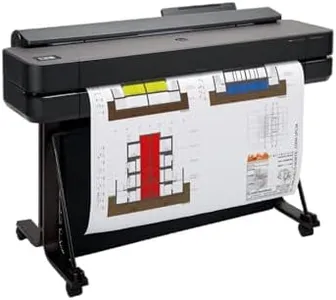
HP DesignJet T650 Large Format 36-inch Plotter Printer, Includes 2-Year Onsite Warranty Support (5HB10T) - New Model

The HP DesignJet T650 is a large-format color printer designed mainly for professionals like architects, engineers, and designers who need precise, high-quality line drawings, posters, and maps. It offers sharp print quality with a resolution of 2400 x 1200 dpi, ensuring crisp text and detailed images. The printer handles wide media sizes up to 36 inches on rolls and also supports sheets up to 13x19 inches, making it flexible for various project types. Paper handling is convenient, thanks to features like an automatic sheet feeder, roll feed, and an auto horizontal cutter, plus it can switch between roll and sheet media without manual intervention, saving time and effort.

Connectivity options are strong, including Gigabit Ethernet, USB 2.0, and Wi-Fi, allowing easy printing from multiple devices or the HP Smart app remotely. Print speed is moderate—around 2.4 pages per minute for color and black & white and up to 82 A1-sized prints per hour—typical for detailed large-format work rather than fast bulk printing. Duplex printing is not supported, which might be a drawback for users wanting double-sided prints. Ink costs can be a consideration; it uses original HP 712 and 713 cartridges with pigment and dye inks, but it is also efficient in using less ink for maintenance compared to competitors, helping reduce ongoing expenses.

Additional perks include an intuitive touchscreen, 2-year onsite warranty, and user-friendly HP Click software that simplifies file handling and reduces paper waste. For those who prioritize reliable, accurate wide-format prints along with ease of use and support, the T650 presents a dependable option, though it is less suited for very high-volume or fast-paced printing environments.

Buying Guide for the Best Hp Color Printers

Choosing the right HP color printer involves understanding your specific needs and matching them with the printer's features. Whether you need a printer for home use, a small office, or a large business, there are several key specifications to consider. These specifications will help you determine the printer's performance, quality, and suitability for your tasks. By understanding these specs, you can make an informed decision and select a printer that best fits your requirements.
Print Quality (Resolution)Print quality, measured in dots per inch (DPI), indicates how detailed and sharp the printed output will be. Higher DPI values mean better print quality. For general home use, a resolution of 600 x 600 DPI is usually sufficient. For professional documents and high-quality photos, look for printers with 1200 x 1200 DPI or higher. Consider what you will be printing most often; if it's mainly text documents, a lower DPI will suffice, but for images and graphics, higher DPI is essential.
Print SpeedPrint speed, measured in pages per minute (PPM), indicates how quickly a printer can produce documents. This is important if you need to print large volumes of documents regularly. Printers with speeds of 20-30 PPM are suitable for home or small office use. For larger offices or high-demand environments, look for printers with speeds of 40 PPM or more. Assess your typical print volume and how often you need to print quickly to determine the right speed for you.
Connectivity OptionsConnectivity options determine how you can connect to the printer. Common options include USB, Wi-Fi, Ethernet, and Bluetooth. For home use, Wi-Fi connectivity is convenient for wireless printing from multiple devices. In an office setting, Ethernet connectivity ensures stable and fast connections. If you need to print from mobile devices, look for printers with Bluetooth or mobile printing capabilities. Consider your typical printing environment and how you prefer to connect your devices.
Paper HandlingPaper handling refers to the types and sizes of paper a printer can accommodate, as well as its paper capacity. If you print a variety of documents, including envelopes and labels, ensure the printer supports multiple paper types and sizes. For high-volume printing, look for printers with larger paper trays (250 sheets or more) to reduce the frequency of refilling. Think about the types of documents you print and how often you print to choose the right paper handling features.
Duplex PrintingDuplex printing allows a printer to print on both sides of the paper automatically. This feature is important for saving paper and creating professional-looking documents. If you frequently print double-sided documents, such as reports or booklets, a printer with automatic duplexing is essential. For occasional double-sided printing, manual duplexing (where you flip the paper yourself) may be sufficient. Consider how often you need double-sided prints to decide if this feature is necessary.
Ink/Toner Cost and YieldInk or toner cost and yield refer to the price of replacement cartridges and how many pages they can print. This is crucial for understanding the long-term cost of owning a printer. High-yield cartridges cost more upfront but print more pages, reducing the cost per page. For home use, standard yield cartridges may be sufficient. For offices with high print volumes, high-yield or extra high-yield cartridges are more economical. Evaluate your printing frequency and budget for supplies to choose the right option.
Additional FeaturesAdditional features such as scanning, copying, and faxing can add versatility to your printer. All-in-one printers that include these functions are ideal for home offices and small businesses. Other features to consider include touchscreen controls, memory card slots, and cloud printing capabilities. Think about the extra tasks you need your printer to perform and choose a model that offers the necessary features to streamline your workflow.

FAQ